
OnLineList0.9.5 - Get APK
You'll be able to download in few seconds.
Publisher Description
NO ROMS AND EMULATORS. ONLY IMAGES, VIDEOS AND QUIZ GAME.
OnlineList is an application inspired by the Windows application OffLineList, where you can see the list of games from different consoles.
With OnLineList in your mobile you can download images of your favorite’s videogames, search videos in youtube, search in wikipedia and set as wallpaper or play with the game "What game is it?" where you must guess his name.
With the application you can:
- Download the list of videogames of different consoles.
- Update the list of consoles PSP and Nintendo DS (long press name).
- Search the name of a videogame.
- Download and cache the images of videogames.
- Set images of videogames as wallpaper.
- Search videos in youtube.
- Search in wikipedia.
OnlineList is an application inspired in windows application “OffLineList”(http://offlinelist.free.fr/). You can download the list of videogames of different consoles, see images of videogames (that download from external websites), know the distribution and the languages of videogame.
The application save the images in a cache. If you download your images with the windows program "OffLineList" you can copy this images in the SD card of your mobile and the application does not download the images. The SD Card has a folder /onlinelist/images with different folders for different consoles as nintendo_ds or atari_5200. Copy the images in the same way is in the "OffLineList" on your SD Card.
You only can update the PSP and Nintendo DS thanks www.advancescene.com.
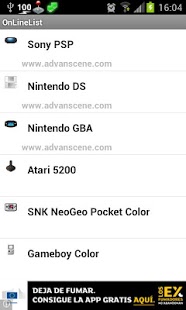
Consoles:
PSP (Update).
Nintendo DS (Update)
Game Boy Advance
(Picture downloaded from www.advancescene.com)
Nintendo Super NES
Game Boy Color
PC Engine
Atari Jaguar
Atari 5200
Nintendo 64
SNK NeoGeo Pocket Color
Gamecube
Atari jaguar
Xbox 360
Xbox Live Arcade
PS3
Wii
WiiWare
Virtual Console
About OnLineList
The company that develops OnLineList is Diego Martin Moreno. The latest version released by its developer is 0.9.5.
To install OnLineList on your Android device, just click the green Continue To App button above to start the installation process. The app is listed on our website since 2014-12-10 and was downloaded 0 times. We have already checked if the download link is safe, however for your own protection we recommend that you scan the downloaded app with your antivirus. Your antivirus may detect the OnLineList as malware as malware if the download link to com.dmartmor.onlinelist is broken.
How to install OnLineList on your Android device:
- Click on the Continue To App button on our website. This will redirect you to Google Play.
- Once the OnLineList is shown in the Google Play listing of your Android device, you can start its download and installation. Tap on the Install button located below the search bar and to the right of the app icon.
- A pop-up window with the permissions required by OnLineList will be shown. Click on Accept to continue the process.
- OnLineList will be downloaded onto your device, displaying a progress. Once the download completes, the installation will start and you'll get a notification after the installation is finished.
Program Details
System requirements
Download information
Pricing
Version History
version 0.9.5
posted on 2014-12-10
v.0.9.5,[Fix] Nintendo DS images,v.0.9.4,[Fix] Errors,v.0.9.3,[Add] Button History of Console,[Fix] Control open browser but it is not install,[Fix] Control version Android to set wallpaper,[Fix] Add permission WRITE_SETTINGS to set wallpaper in Alcatel mobiles,v.0.9.1,[Add] Nintendo Super NES,[Fix] Fix bug close application
version 0.8.0
posted on 2011-03-31
Several fixes and updates
Disclaimer
External Download
We do not host OnLineList on our servers. We did not scan it for viruses, adware, spyware or other type of malware. This app is hosted by Galad and passed their terms and conditions to be listed there. We recommend caution when installing it.
The APK Download link for OnLineList is provided to you by apps112.com without any warranties, representations or guarantees of any kind, so access it at your own risk.
If you have questions regarding this particular app contact the publisher directly. For questions about the functionalities of apps112.com contact us.
